IT BUDDY
Older adults (ages 55+) struggle to be independent in a world that requires basic knowledge of technology. As part of a team, I designed an app this age group can comfortably turn to in order to build digital literacy & confidence at their own pace.
Over the course of six weeks, I conducted competitor analysis, user interviews and interactive prototyping based on user feedback and usability testing. Moving forward, I intend to create a functional version of the app using ChatGPT API, and explore tech support methods and additional learning features.
Type of project: End-to-end app
Role(s): UX Researcher, UX Designer
Industry: Ed Tech
Tools: Figma, Framer
March 2025 - June 2025
I contributed throughout every stage of the UX process. My responsibilities included: helping to create interview & testing protocols, recruiting & conducting interviews & user testing as well as designing the Settings/Language page. Additionally, I contributed to the putting together our literature review and designing other prototyped pages.
Context
Goal
fljdsklfjsdlfjsdljflskdjflkdjsfljdsl
The issue
Older adults (typically aged 55+) struggle with navigating technology essential for everyday tasks. Studies show that older adults with lower digital literacy often face emotional barriers like anxiety, low self-confidence and disorientation when attempting to use unfamiliar interfaces(Kumar et al., 2013; Lee et al., 2022).
These emotional factors can significantly impede learning and engagement.
I wanted to create a learning tool older adults with low digital literacy could confidently turn to for most technology questions without feeling frustration.
To address these challenges, research suggests this design provide:
A simple, linear layout (Ahmad et al., 2022; Vercruyssen et al., 2023)
Jargon-free language (Ahmad et al., 2022)
Multi-modal support. Combining visual, auditory and interactive elements (Ahmad et al., 2022; Vercruyssen et al., 2023)
Emotional ease (Jang & Je, 2022; Martinez-Alcala et al., 2021)
A judgement-free learning environment (Jang & Je, 2022; Martinez-Alcala et al., 2021)
-
Ahmad, N. A., Abd Rauf, M. F., Mohd Zaid, N. N., Zainal, A., Tengku Shahdan, T. S., & Abdul Razak, F. H. (2022). Effectiveness of instructional strategies designed for older adults in learning digital technologies: A systematic literature review. SN Computer Science, 3(2). https://doi.org/10.1007/s42979-022-01016-0
Ali, A., Raza, A. A., & Qazi, I. A. (2023). Validated digital literacy measures for populations with low levels of internet experiences. Development Engineering, 8. https://doi.org/10.1016/j.deveng.2023.100107
Castilla, D., Botella, C., Miralles, I., Bretón-López, J., Dragomir-Davis, A. M., Zaragoza, I., & Garcia-Palacios, A. (2018). Teaching digital literacy skills to the elderly using a social network with Linear Navigation: A case study in a rural area. International Journal of Human-Computer Studies, 118, 24–37. https://doi.org/10.1016/j.ijhcs.2018.05.009
Jang, S. H., & Je, N. J. (2022). The relationship between Digital Literacy, loneliness, quality of life, and health-promoting behaviors among the elderly in the age of covid-19. International Journal of ADVANCED AND APPLIED SCIENCES, 9(4), 71–79. https://doi.org/10.21833/ijaas.2022.04.009
Kumar, S., Ureel, L. C., King, H., & Wallace, C. (2013). Lessons from our elders: identifying obstacles to digital literacy through direct engagement. Proceedings of the 6th International Conference on PErvasive Technologies Related to Assistive Environments, 1–8. https://doi.org/10.1145/2504335.2504357
Lee, H., Lim, J.-A., & Nam, H.-K. (2022). Effect of a digital literacy program on older adults’ digital social behavior: A quasi-experimental study. International Journal of Environmental Research and Public Health, 19(19), 12404. https://doi.org/10.3390/ijerph191912404
Martínez-Alcalá, C. I., Rosales-Lagarde, A., Pérez-Pérez, Y. M., Lopez-Noguerola, J. S., Bautista-Díaz, M. L., & Agis-Juarez, R. A. (2021). The effects of covid-19 on the digital literacy of the elderly: Norms for digital inclusion. Frontiers in Education, 6. https://doi.org/10.3389/feduc.2021.716025
Reddy, P., Chaudhary, K., & Hussein, S. (2023). A digital literacy model to narrow the Digital Literacy Skills Gap. Heliyon, 9(4). https://doi.org/10.1016/j.heliyon.2023.e14878
Vercruyssen, A., Schirmer, W., Geerts, N., & Mortelmans, D. (2023). How “BASIC” is Basic Digital Literacy for older adults? insights from Digital Skills Instructors. Frontiers in Education, 8. https://doi.org/10.3389/feduc.2023.1231701
My top three goals for this project are:
-Help older users feel more confident about their digital literacy and technological abilities
-Create simple design easily used by all skill levels
-Reduce user’s frustration with modern technology
Learn
Competitor Analysis
Looking over other apps, there was a gap for an app that could gradually increase digital literacy and provide tech support without requiring a paid subscription, complicated language or a basic level of technology knowledge.
Initial Interviews
The team interviewed 6 individuals over the age of 55 about their comfort level and common issues with technology.
We discovered:
Participants did not “explore” technology and try to solve issues on their own because of their strong fear of “messing something up”
Without help, difficult tasks often resulted in abandoning the task.
“Technology language” was often too complicated for the user to understand
Participants struggled to understand abstract concepts (authentication, cloud storage, etc)
Some participants were wary of AI. They did not understand it and how it worked.
When peers were asked about the best learning strategies for older adults with low digital literacy, many said demonstration and step by step guidance were most helpful.
To improve digital literacy, participants believed that patience, practice, and a combination of text and image based examples would lead to highest rates of digital literacy improvement.
Many reported their need to help their relatives with the same topic repeatedly. This highlighted the struggle for older adults to retain information
Responses from the class activity pushed us to focus on clear visuals, language understood by all and tutorials that could be revisited.
Survey
Evaluate
Barriers
This is how IT buddy will do that:
Step-by-step guidance
Plain language
No skill-level assumption
Confidence building
Learn tech concepts & have them stick
IT assistance on-demand
In-depth explanation of AI and how it works
Accessible to everyone
Three main barriers arose after the first interviews and class activity:
language confusion, fear of failure, and frustration
This is very in-line with the goals I mentioned at the beginning of the project and issues I wanted to tackle with IT Buddy.
Features
These are the features IT Buddy will have & how it stays in-line initial goals:
Customizable language tone
Digital literacy assessment at onboarding
Chat history feature
common tips and tricks
Quizzes based on past questions
Apply
Prototypes
I designed a low-fidelity prototype
Low fidelity pages included:
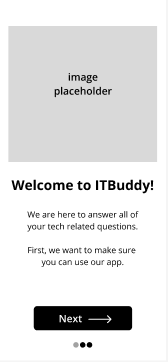
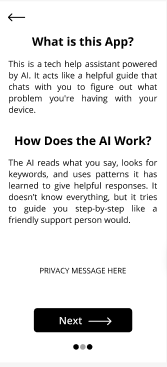
Welcome pages, How-to pages, Question History pages, Chat example pages
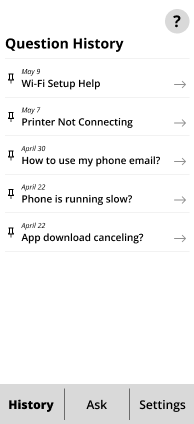
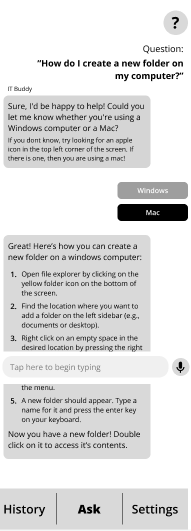
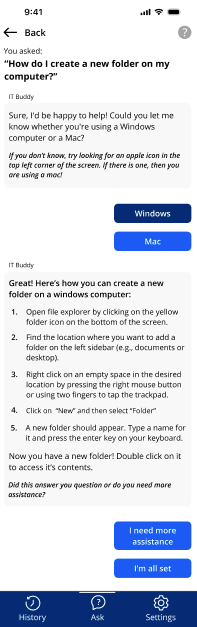
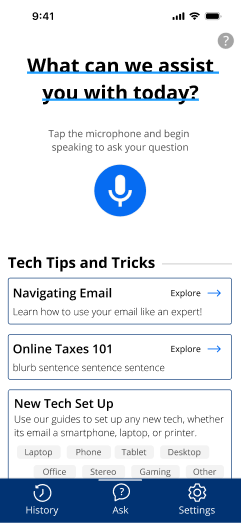
I continued to work on the prototype and produced a mid-fidelity prototype. Screenshots are shown below:
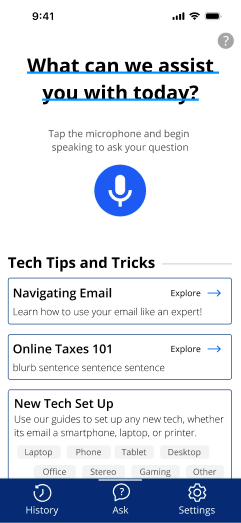
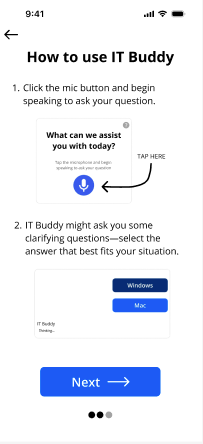
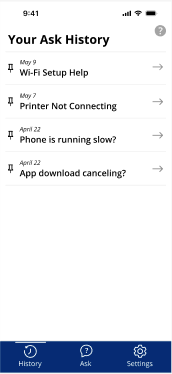
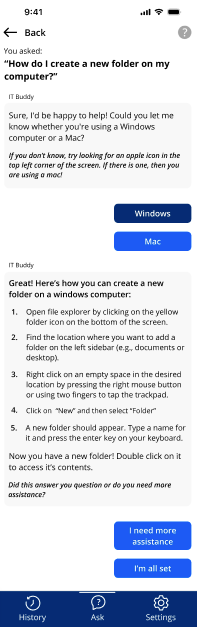
These were the changes & features changed/added:
-Images, styles & assets added.
-Wording made simpler, focused on using less text.
-Added Tips and Tricks to Home Page.
-Added Speech option.
-Video responses added show how to fix problems.
-“Language type” option added to settings.
-“Did this answer your question or do you need additional assistance” button added.
Usability Testing
User Testing participants had 4 tasks to work through for the testing phase:
-
Start: Iphone app library, End: IT Buddy Home Screen.
Success: Navigate through first-time user flow without errors or assistance
-
Start: IT Buddy Homescreen
Scenario: “Ask the app to help you create a folder on Windows”
Success: Submit questions and understand the responses given by app
-
Start: IT Buddy home screen
Scenario: “Change the tone of the responses from IT Buddy”
Success: Locate and adjust language settings within the app
-
Start: Windows/Mac desktop
Scenario: “Walk through the steps from Task 2 to create a new folder on your desktop”
Success: Creation of a folder on their own Windows/ Mac desktop
Every task was followed by a series of questions gauging difficulty, usefulness, etc
Refine
Usability test results were promising:
Most users successfully completed the first 3 tasks successfully with a ASQ score above 4
The final task was more challenging with an average ASQ score of 3.4 and one incomplete
The overall SUS score was 82, making the app usable & well-received
Based on these test results, the app is approachable, supportive & effective!
Future work on IT Buddy
Create a functional version using Chat GPT API
Goal: Improve test scores
Visual Redesign
Goal: Improve the look of colors, buttons, fonts, etc. Make brand look welcoming and clean
Improve Learning Features
Goal: Add/change current features to improve and simplify learning. Add quizzes, daily or weekly excercises. Include a glossary of terms. optional class mode.
Alternative support options
Goal: Provide additional support that might help astressed older adult. Add “?” button for clarification to chat bot response. Tech support via phone call.
Our initial goals with IT Buddy were to reduce frustration with technology, enable older adults to navigate technology independently and increase digital literacy.
Although the current prototype does not have the ability to take these goals on, usability testing for IT buddy suggests there is a solid baseline to start with. The app is approachable, supportive and effective.
We look forward to improving IT Buddy further!